
Self-Hosted Kubernetes Deployment Guide
This document describes the recommended technical process for deploying the Parallel Works ACTIVATE control plane into a customer-managed, self-hosted Kubernetes environment such as Red Hat OpenShift. The guide reflects a production-oriented deployment model and preserves flexibility for customer-specific infrastructure and security requirements. Parallel Works will provide validated Helm charts and Kubernetes manifests as part of the deployment engagement.
Deployment Topology
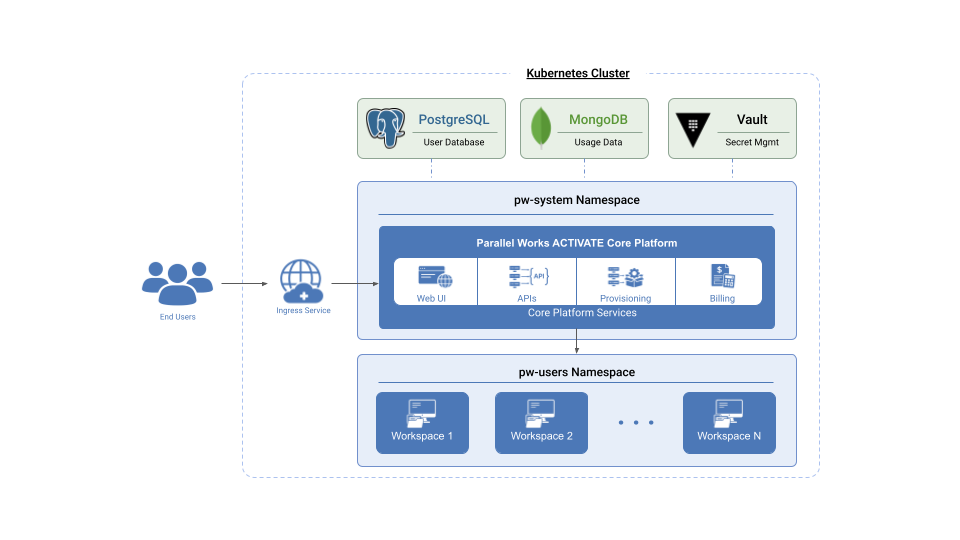
The following diagram illustrates the deployment architecture for ACTIVATE on Kubernetes:
Minimum Node Requirements
The following tables outline the minimum resource requirements for deploying ACTIVATE.
Cluster Sizing
| Deployment Size | Nodes | CPU per Node | RAM per Node | Total CPU | Total RAM |
|---|---|---|---|---|---|
| Minimum | 3 | 4 cores | 16 GiB | 12 cores | 48 GiB |
| Recommended | 5 | 8 cores | 32 GiB | 40 cores | 160 GiB |
Equivalent instance types: AWS m5.xlarge (minimum) / m5.2xlarge (recommended), GCP n2-standard-4 / n2-standard-8.
Platform Resource Requests (Default Scale)
At defaultScale: 1, the ACTIVATE platform services require approximately:
| Category | CPU | Memory | Persistent Storage |
|---|---|---|---|
| Core platform services | 6 cores | 6 GiB | — |
| Background workers | 7 cores | 11 GiB | 11 GiB |
| Supporting services (message queue, secrets) | 2 cores | 4 GiB | 3 GiB |
| Billing and usage | 2.5 cores | 4 GiB | — |
| Total | 17.5 cores | 25 GiB | 14 GiB |
Additional headroom is required for Kubernetes system pods (CoreDNS, kube-proxy, CNI) and the database services below.
Database Requirements
| Database | CPU | Memory | Storage |
|---|---|---|---|
| PostgreSQL | 2 cores | 6 GiB | 50 GiB |
| MongoDB (3-node replica set) | 2 cores per node | 4 GiB per node | 50 GiB |
Shared Storage
A shared filesystem with ReadWriteMany access is required for platform file storage:
| Purpose | Minimum Size | Access Mode |
|---|---|---|
| User uploads, media, and workflow assets | 10 GiB | ReadWriteMany |
Additional ReadWriteOnce volumes (~10 GiB total) are provisioned automatically for internal caching and message queue data.
Supported shared storage backends include AWS EFS, GCP Filestore, or any other NFS or ReadWriteMany-capable storage class.
Prerequisites and Assumptions
Before beginning the deployment, ensure the following requirements are met:
- Kubernetes Environment: A dedicated Kubernetes or OpenShift cluster for ACTIVATE (see Minimum Node Requirements above)
- Cluster Access: Cluster-admin privileges during installation
- Storage: Persistent storage class available for PVCs and a shared filesystem (EFS, Filestore, or any other NFS or ReadWriteMany-capable storage class)
- DNS: External DNS entry for the ACTIVATE ingress endpoint
- TLS Certificates: TLS certificates issued for the chosen domain
- Registry Access: Outbound access to the Parallel Works container registry
Supporting Services Provisioning
ACTIVATE relies on several supporting services for metadata, billing, and secret management. These services are deployed into the cluster using Helm charts and Kubernetes manifests provided by Parallel Works.
PostgreSQL (Usage and Billing Data)
- Version: PostgreSQL 18
- Deployment: Kubernetes-managed service or managed database (e.g. AWS Aurora, GCP Cloud SQL)
- Baseline Resources: 2 vCPU, 6 GiB RAM, 50 GiB storage
- Purpose: Usage metrics, billing, and activity tracking
MongoDB (User and Platform Metadata)
- Version: MongoDB 8.x
- Deployment: Replica set mode with 3 nodes (required for sessions and transactions)
- Baseline Resources: 2 vCPU, 4 GiB RAM per node
- Purpose: User accounts, platform configuration, and metadata
HashiCorp Vault (Secrets Management)
- Edition: Vault Community Edition
- Deployment: In-cluster
- Baseline Resources: 1 vCPU, 2 GiB RAM
- Requirements:
- Vault must be initialized and unsealed
- Deployment engineers must have access to create a Vault token or have the root token available
- Purpose: Secure storage of credentials and sensitive configuration
Core Platform Deployment
The ACTIVATE control plane is deployed via Helm and a custom Kubernetes resource managed by the Parallel Works operator.
Namespace and Persistent Storage
- Create a dedicated namespace for the core platform, for example
pw-system - Provision a PersistentVolumeClaim of approximately 10 GiB with
ReadWriteManyaccess mode - This volume stores user-uploaded images and marketplace workflow assets
Kubernetes Secrets
Create Kubernetes secrets in the core platform namespace for the following:
- Container registry pull credentials (provided by Parallel Works)
- PostgreSQL credentials
- MongoDB credentials
- Vault token
Operator Installation
Add the Parallel Works Helm repository and install the operator:
helm repo add corerepo https://parallelworks.github.io/helm
helm upgrade --install parallelworks-operator corerepo/operator \
  --namespace pw-operator-system \
  --create-namespace
ACTIVATE Platform Custom Resource
Deploy the ACTIVATE platform by applying a ParallelWorks custom resource. This resource defines image versions, scaling defaults, ingress configuration, TLS, and database connectivity. Key configuration elements include:
- Platform image registry credentials
- Ingress hostname and TLS secret
- PostgreSQL endpoint and credential secret
- MongoDB replica set endpoints
Parallel Works will provide a validated YAML manifest customized for the customer environment. See Sample Configuration below for a YAML example.
Resulting Platform Namespace
Once applied, the operator provisions all ACTIVATE services into the designated core namespace (for example pw-system). This namespace hosts the control plane components and ingress services.
User Workspace Configuration
User workspaces are isolated into a separate namespace. Each user is assigned a dedicated Kubernetes StatefulSet that manages a single pod. Pods are scaled up when the user is active and scaled down when idle.
Resource Defaults
Each user workspace is provisioned with the following default resource allocation:
| CPU | Memory | |
|---|---|---|
| Requests | 500m | 512 MiB |
| Limits | 1 core | 2 GiB |
These values are configurable per user through the ACTIVATE platform.
Home Directory Storage
Each user is provisioned a 5 GiB home directory. Storage can be configured in one of two modes through the platform:
- Per-user PersistentVolumeClaim — Each user receives a dedicated PV for their home directory
- Shared storage mount — Users share a ReadWriteMany volume (e.g. NFS, EFS, or Filestore)
Ingress and External Access
An ingress controller or external load balancer must be configured to expose port 443 to the ACTIVATE ingress service running in the core platform namespace.
- DNS should resolve the chosen domain to the ingress endpoint
- TLS termination is handled using the configured Kubernetes TLS secret
Initial Platform Access
After ingress is operational, access the ACTIVATE web interface via HTTPS on the configured domain.
The initial setup workflow allows you to:
- Enter the ACTIVATE license key
- Create the first platform administrator account
Once completed, the platform is ready for user onboarding and workspace provisioning.
Sample Configuration
Below is a sample ParallelWorks custom resource YAML configuration:
---
apiVersion: v1
kind: Namespace
metadata:
  name: <namespace>
---
apiVersion: platform.parallelworks.com/v1alpha1
kind: ParallelWorks
metadata:
  name: <deployment-name>
  namespace: <namespace>
spec:
  image:
    registry: <registry-url>
    repositoryPrefix: <repository-prefix>
    tag: <version>
    pullPolicy: IfNotPresent
    pullSecrets:
      - name: <image-pull-secret-name>

  # Default scale for all services that don't specify their own replicas
  defaultScale: 1

  # Ingress hostname for the platform
  host: <your-domain>

  # TLS certificate secret
  tlsSecretName: <tls-secret-name>

  # Database configuration
  database:
    postgres:
      endpoint: '<postgres-host>:<postgres-port>'
      database: '<database-name>'
      username: '<username>'
      urlSecretRef:
        name: '<postgres-secret-name>'
        key: '<password-key>'

    mongodb:
      replicaSetName: '<replica-set-name>'
      endpoints:
        - '<mongodb-node-0-host>:27017'
        - '<mongodb-node-1-host>:27017'
        - '<mongodb-node-2-host>:27017'
Customization
This is a sample configuration. Parallel Works will provide a validated and customized manifest tailored to your specific environment during the deployment engagement.
Next Steps
After completing the deployment:
- Configure authentication providers (e.g. OAuth/LDAP)
- Set up user groups and permissions
- Configure compute resources and cloud providers
- Import or create workflows in the marketplace
For additional assistance, please contact Parallel Works support or your deployment engineer.