
For Organization Admins
About Partners, Organizations, and Groups
On the ACTIVATE platform, we use partners, organizations, and groups to organize users and manage access permissions. This user hierarchy is shown in the diagram below with a detailed explanation afterward.
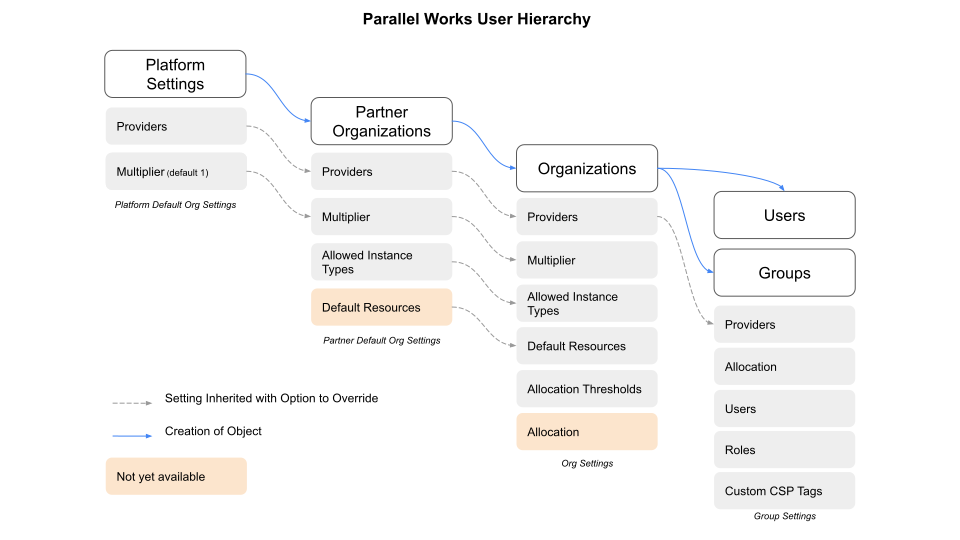
Platform Settings are the highest level from which the platform can be configured. Only ACTIVATE administrators can manage these settings. Currently, the settings that can be configured at the platform level are cloud service providers (CSPs) and multipliers.
The next management level is Partner Organizations, which have the ability to create other organizations. Organizations created by a partner organization are considered to be managed by the partner organization. Any organization that manages another organization can:
- access all of the organization's settings, users, groups, and CSP billing data.
- set custom billing multipliers.
- configure allowed instance types.
All organizations can:
- configure allowed instance types.
- configure default resources, which are created for new users.
- customize the organization theme, sidebar, and login banner.
Groups are used to manage user permissions that affect the administration of users, groups, and group settings. Note that to configure many of these settings, you must be in a group with the org:admin role, or a role specific to the setting you're configuring. Partner organizations and ACTIVATE administrators are automatically granted necessary roles to configure organizations. For more specific information, please see About Group Roles below.
Users are intended to be named users (i.e. one real person per username), and our system is designed around this idea.
These elements create a user hierarchy with a waterfall structure, where each tier inherits the settings above it but can be overridden at the lower level.
Navigating Organization Settings
When you select an organization, you'll see a sidebar on the left with the following sections:
- Users and Groups — Manage the people in your organization.
- Settings — Configure Authentication, Policies, Webhooks, and Variables.
- Customize — Adjust the Theme, Sidebar, Onboarding, and Login Banner.
- Cloud — Manage Cloud Accounts, Instance Types, Bootstrap Script, and Reservations, and view your organization's Network Topology.
- Billing — View the Cost Dashboard and configure Allocation Thresholds.
- Partner — For partner organizations: configure Billing Multiplier and Instance Limits.
- Admin — Platform-level configuration, visible to platform administrators only.
Organizations for Partners and ACTIVATE Administrators
The Organizations list will look different for you than it will for most users. Partners and administrators see a list that includes their own organization and all organizations that they manage.
This page displays each organization's name and which organization it's managed by (if any). Click on any organization to open its settings.
There are two features that are important for partner organizations: configuring billing multipliers and creating organizations.
About Group Roles
We currently have four ACTIVATE roles to customize user permissions within your organization.
- Users with the
org:adminpermission have full control. They can make any changes to any settings in the organization. - Users with the
org:settingspermission can manage organization settings. - Users with the
org:userspermission can create and manage users. - Users with the
org:groupspermission can create and manage groups. However, they cannot assign or remove roles for groups; only users with theorg:adminpermission have access to make those changes.
These roles are controlled through groups. All users within a group have the same permissions. Groups can also have multiple roles assigned to them.
At this time, you cannot assign roles to individual users.